In this article
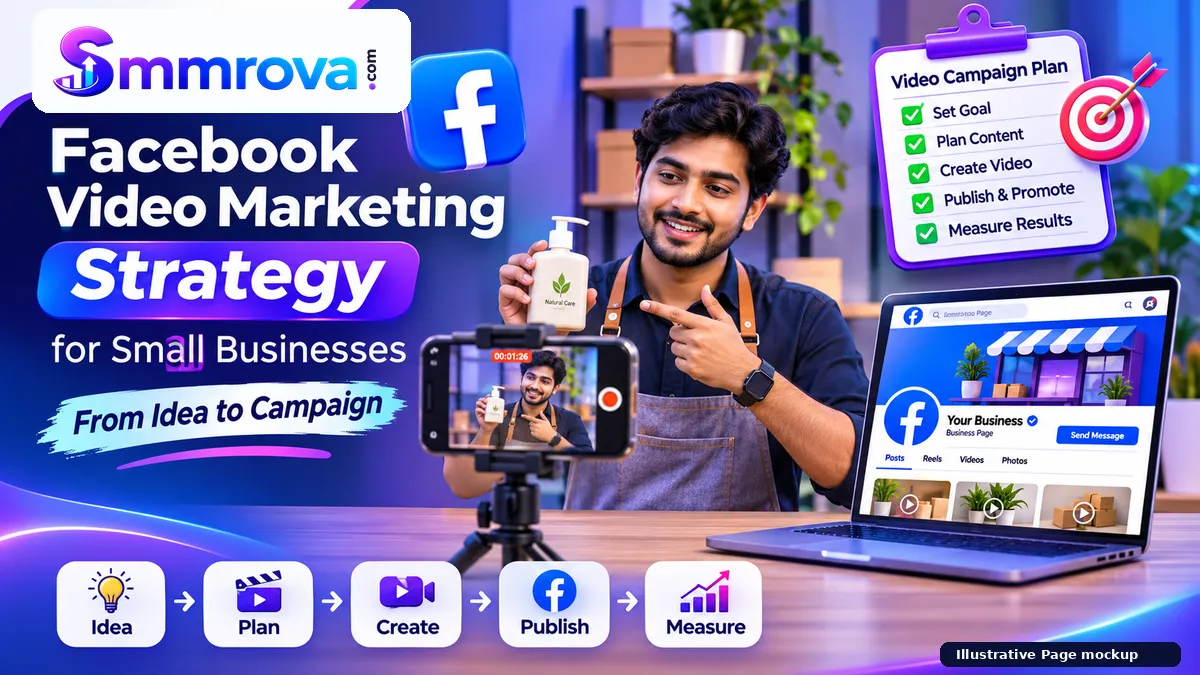
A Facebook video marketing strategy gives your business a clear plan for what to create, who to reach, what action to encourage, and how to measure the result. Instead of uploading videos whenever you have time, you connect each video to a specific business purpose.
For a small business, video production does not need to start with an expensive camera or a large advertising budget. A smartphone, a useful idea, a clear message, and a repeatable workflow can be enough to begin. The important part is knowing what each video should communicate and what you want viewers to do next.
This guide explains how to plan a Facebook video campaign from the first idea to publishing and performance review. It covers organic content as well as the basics of paid promotion, without assuming that views automatically lead to customers.
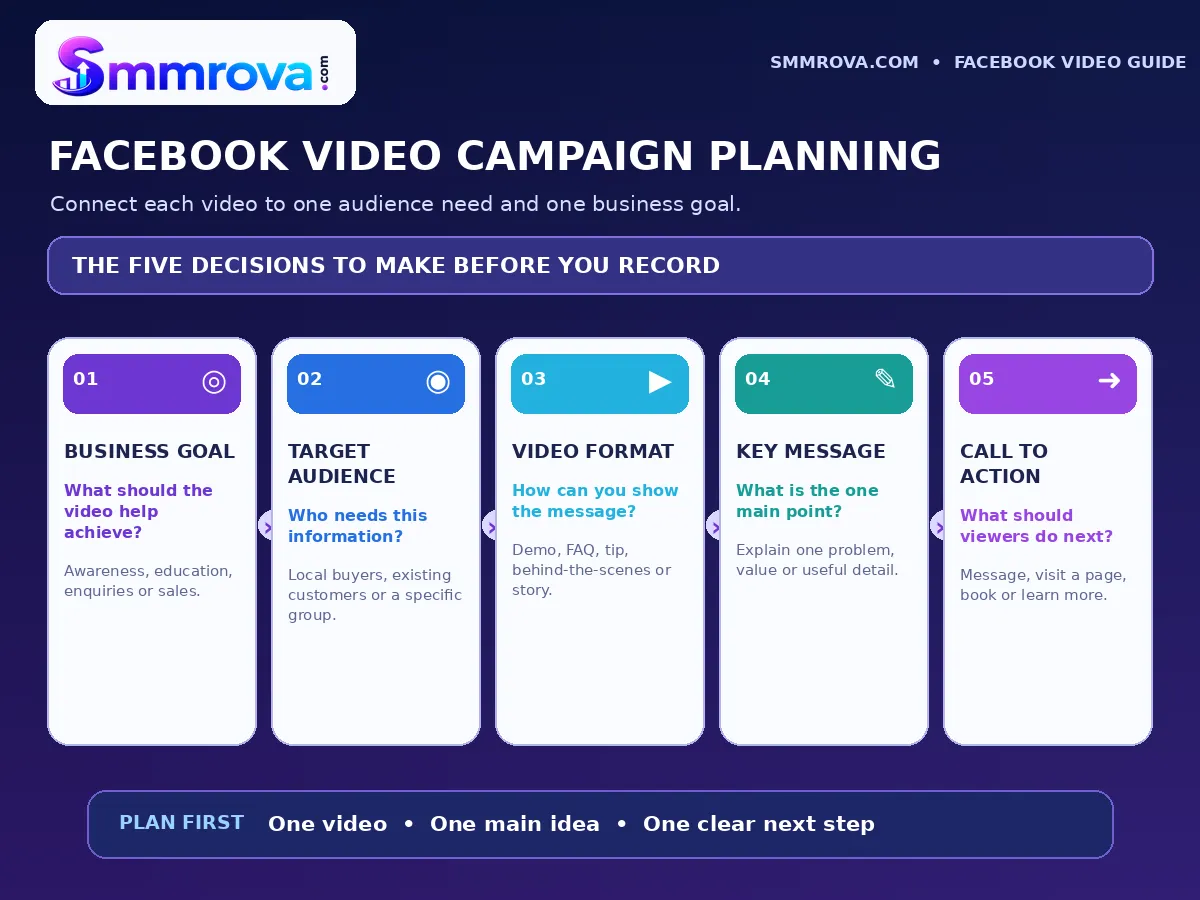
1. Start With a Clear Business Goal
Before recording anything, decide why your business needs the video. A video designed to introduce your brand should not necessarily use the same message or call to action as a video intended to generate enquiries.
Choose one main goal for each campaign. Examples include:
- Brand awareness: Help people understand what your business offers and who it serves.
- Product or service education: Demonstrate how something works, explain its benefits, or answer a common question.
- Customer enquiries: Encourage interested viewers to send a message, request a quotation, or ask about availability.
- Website visits: Direct people to a relevant product, service, booking, or information page.
- Sales: Explain a product or offer clearly and make the next purchase step easy to understand.
Use the goal to decide what success means. For example, if you want enquiries, a video with fewer views but more relevant messages may be more useful than a video with many views and no customer conversations.
| Business goal | Useful video approach | What to review |
|---|---|---|
| Awareness | Brand introduction or behind-the-scenes video | Reach, views and watch time |
| Education | Tutorial, demonstration or FAQ | Watch time, retention and questions |
| Enquiries | Service explanation with a message or booking CTA | Relevant messages, enquiries and bookings |
| Website visits | Product overview or problem-solving video | Link clicks and useful website activity |
| Sales | Product demonstration and offer explanation | Qualified leads, orders and revenue |
2. Understand Your Target Audience
A useful video speaks to a specific group of people. If you try to address everyone in one video, the message can become too general to be memorable.
Write down the answers to these questions before preparing the script:
- Who is most likely to need this product or service?
- What problem are they trying to solve?
- What questions do they usually ask before making a decision?
- What concerns might stop them from contacting or buying from you?
- What action would be helpful for them to take next?
For example, a local bakery may want to reach people planning birthdays or family events. Its videos could show cake decoration, explain available sizes, answer questions about advance orders, and demonstrate how customers can place an order. That is more specific than posting a general video saying that the bakery sells cakes.
Use language your customers naturally understand. A local business may find that straightforward Bangla, English, or a suitable mix works better for its audience than complicated marketing language. The message should remain clear even when the video is watched without sound.
3. Choose the Right Video Format
Different video formats serve different purposes. Select the format based on the message, the product, and the audience's questions rather than choosing a format only because it is popular.
Product or service demonstration
Show the product in use or explain how a service works. A clothing shop could show fabric details and available styles. A home-service business could explain the steps involved in a standard visit.
Frequently asked questions
Answer one real customer question in each video. Useful topics include price factors, delivery areas, booking steps, product care, preparation requirements, and service availability.
Behind-the-scenes content
Show how your team prepares an order, handles a service request, packages a product, or maintains a workspace. Share only genuine activities and obtain permission before showing customers or private information.
Educational tips
Explain a small problem your audience often faces and provide a practical solution. A helpful tip can introduce your expertise without turning every video into a sales pitch.
Customer experience or case story
With the customer's permission, share a real experience that explains the customer's problem, the service provided, and what happened. Do not invent testimonials, alter the meaning of feedback, or present an exceptional result as a typical guarantee.
Live or longer explanatory video
A live session or longer video may suit product walkthroughs, demonstrations, interviews, or detailed explanations. Use it when the topic genuinely needs more time. A short video is not automatically better for every subject.
Meta announced a simplified Facebook video publishing experience in which new videos are shared as Reels. Facebook continues to support different types of video content, including short, long and Live video. Check the current publishing interface and audience settings before posting because product features can change. See Meta's Facebook video publishing update.
4. Build a Simple Video Script
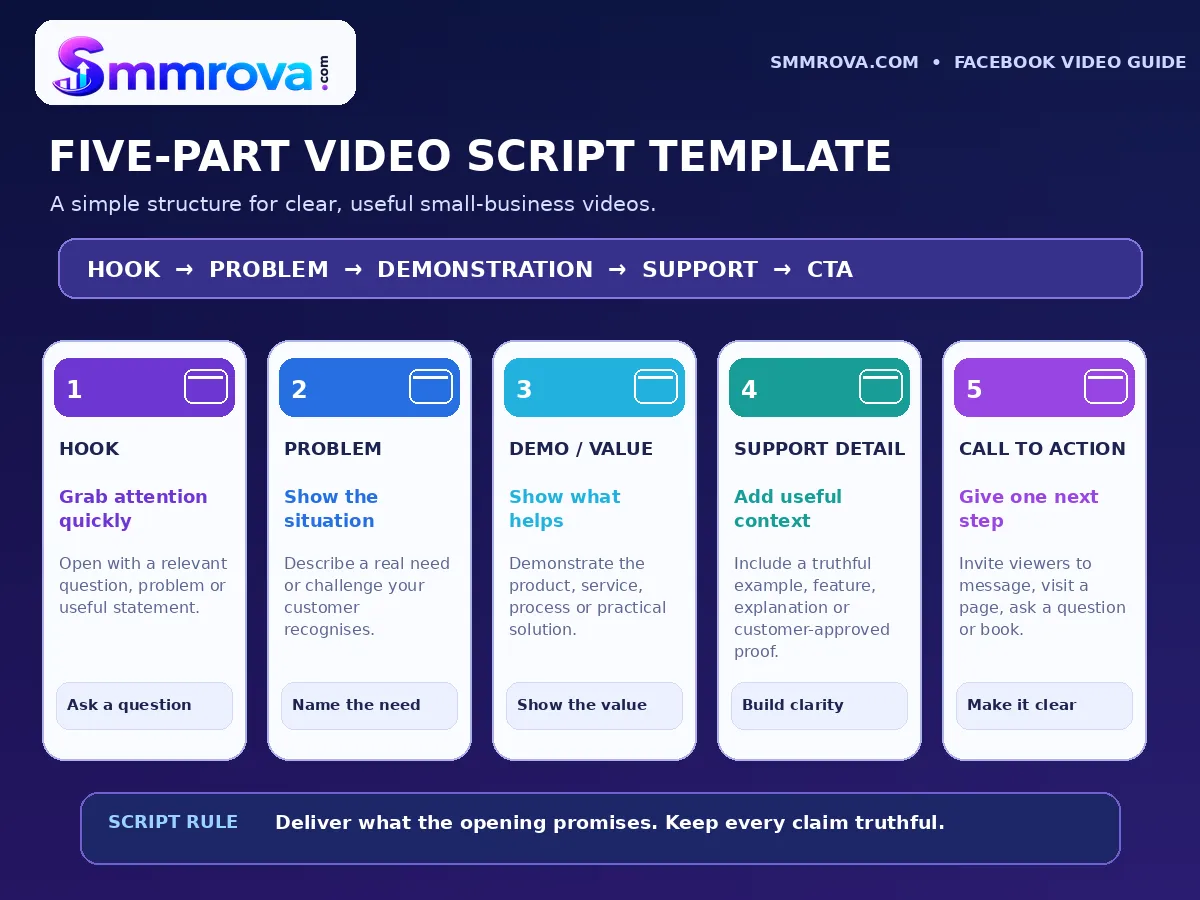
A script helps you stay focused while recording. It does not need to sound formal or memorised. Prepare the main points, then speak naturally.
A practical video structure has five parts:
- Hook: Start with a question, problem, useful statement, or visual that gives the audience a reason to continue.
- Problem or context: Explain the situation your customer may recognise.
- Value or demonstration: Show the product, explain the process, or provide the useful information promised by the opening.
- Supporting detail: Add a genuine demonstration, relevant detail, or customer-approved evidence where appropriate.
- Call to action: Give the viewer one clear next step, such as sending a message, visiting a page, or requesting a quotation.
Example script for a local cleaning service
Hook: “Not sure which areas to prepare before a home cleaning appointment?”
Problem: “Many customers are unsure what the team needs access to before a visit.”
Value: “Here are three simple steps: clear access to the rooms, secure personal items, and tell us about any areas that need special attention.”
Supporting detail: Show the actual preparation checklist used by the business.
Call to action: “Send us a message to ask about service availability in your area.”
This structure can be adapted for a shop, restaurant, salon, educational service, or product seller. Keep the information truthful and make sure the video delivers what the opening promises.
5. Produce the Video for Mobile Viewers
Many people discover business content while using Facebook on a phone. Review the video on a mobile screen before publishing and make sure the important details are easy to understand.
- Keep the opening focused: Avoid a long logo animation or unrelated introduction before explaining why the video matters.
- Use clear lighting: Record where the product, person, or demonstration can be seen properly.
- Record understandable audio: Reduce background noise and check voice clarity before filming the full video.
- Add readable captions: Use subtitles or on-screen text so the main message remains understandable without sound.
- Keep text within safe viewing areas: Preview the video in its intended placement so interface elements do not cover important information.
- Use original or properly licensed material: Record your own footage or use assets you have permission to use.
- Include branding naturally: Use your logo, colours, or business name where useful, without covering the main subject.
Do not repost someone else's video with only minor changes and describe it as original work. Meta's updated guidance says that original content and meaningful creative contributions matter, while duplicative or minimally edited content may be deprioritised. Read Meta's original content guidance before building a strategy around reused footage.
6. Publish and Distribute the Video Thoughtfully
Before publishing, check the video, caption, destination, and audience settings. A simple publishing checklist can prevent avoidable mistakes.
- Confirm that the video communicates one main idea.
- Check captions, spelling, audio, and visual quality.
- Write a caption that adds context instead of repeating every word from the video.
- Use relevant keywords naturally when they help people understand the topic.
- Add one clear call to action that matches the campaign goal.
- Check the Page and video audience settings before publishing.
- Respond helpfully to genuine questions and comments after publication.
Share the video with people or communities who would genuinely find it relevant. Avoid repetitive posting, unsolicited mass messages, misleading descriptions, or unrelated group sharing. You can also adapt a video for your website, email, or another social platform, but review the format, caption, permissions, and audience expectations for each destination.
Organic publishing and paid promotion are different
Organic publishing lets you share useful content with your Page audience and people who may discover it through Facebook. Paid promotion uses advertising tools to reach an audience based on campaign settings and the objective you select.
If you use Meta Ads Manager, choose the campaign objective according to the business result you need. For example, a business seeking enquiries should plan around leads or conversations rather than assuming that a video-view result will produce customers. Meta's current advertising documentation describes outcome-based objectives such as Awareness, Traffic, Engagement, Leads, and Sales. Available choices and settings can vary by campaign and account.
7. Measure Performance and Improve the Next Video
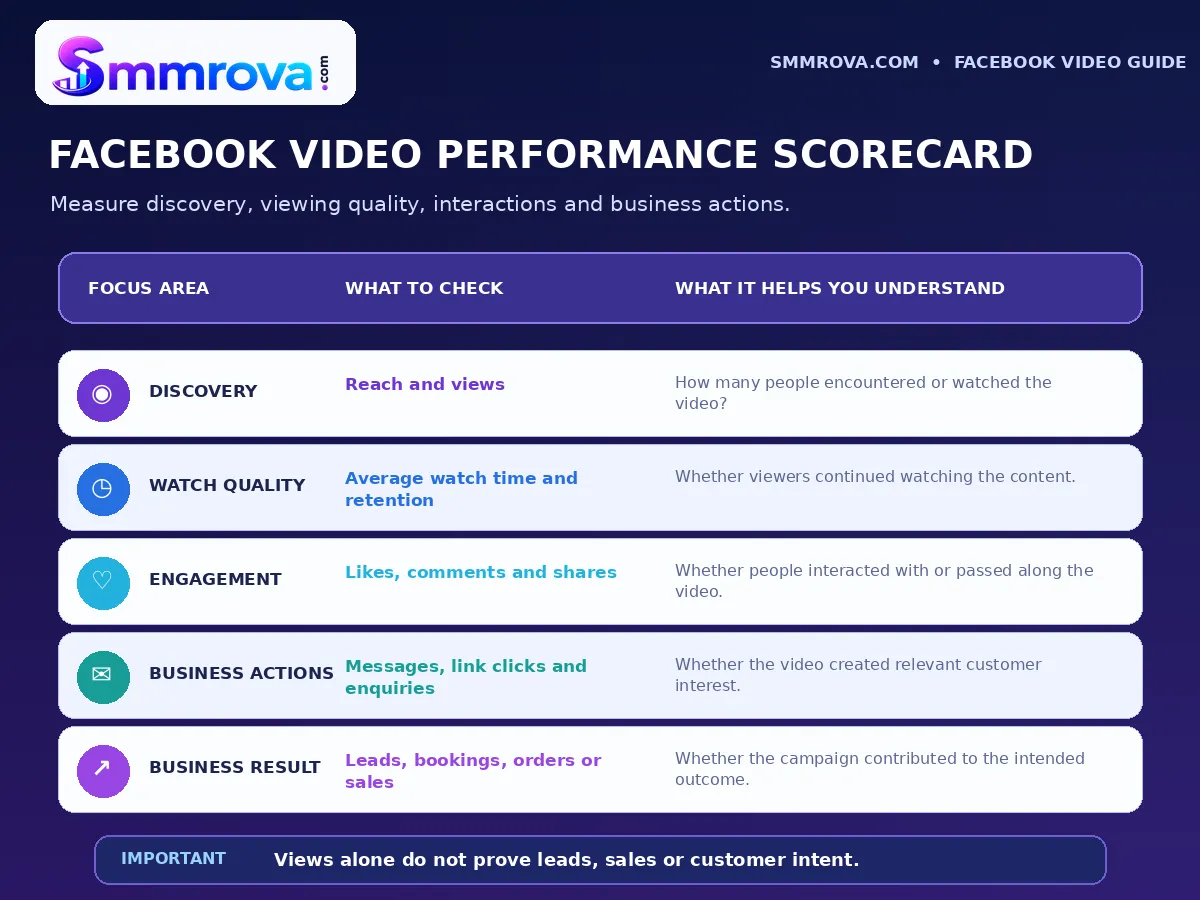
Do not judge a video only by its view count. Views can help you understand whether people are encountering the content, but they do not automatically show whether viewers understood the message, became interested, contacted the business, or made a purchase.
Use Meta Business Suite Insights to review Page and content performance. Depending on the available account features, you may be able to review views, interactions, follows, and individual content performance. Meta also documents video-level insights such as average time watched, retention, likes, comments, shares, and follows.
| What you want to learn | Metrics or signals to review | Possible next step |
|---|---|---|
| Are people discovering the video? | Reach and views | Review the topic, audience and distribution. |
| Are viewers staying? | Average watch time and retention | Improve the opening, pacing or clarity. |
| Is the content useful? | Comments, shares and other interactions | Explore questions and topics people respond to. |
| Is the video creating business interest? | Relevant messages, enquiries, link clicks or bookings | Review the offer, information and call to action. |
| Is it contributing to sales? | Orders and revenue tracked through your business process | Check the customer journey beyond the video. |
To review your Page's available overview, open Meta Business Suite, select the relevant Page, and look under Insights. The layout and available reports may vary. For more detail, see Meta's Insights overview guidance and its video insights documentation.
When comparing videos, compare similar goals and formats where possible. A product demonstration and a brand introduction may serve different purposes, so their results should not be judged by exactly the same measure.
8. Use a Repeatable Review Process
A video campaign becomes easier to manage when you review it regularly and make one or two specific improvements at a time.
- Record the starting plan: Write down the audience, goal, video topic, and intended action before publishing.
- Review the available results: Check views, watch time, interactions, and the business outcome that matches your goal.
- Identify one improvement: For example, make the opening clearer, show the product earlier, simplify the explanation, or use a more relevant CTA.
- Apply the learning: Use the improvement in the next video and compare the result with similar content.
Keep a simple spreadsheet with the publication date, topic, goal, format, main CTA, and results. Over time, this record can help you identify which subjects generate useful questions, which demonstrations hold attention, and which messages lead to relevant enquiries.
Common Facebook Video Marketing Mistakes
- Publishing without a goal: Decide what the video should achieve before recording.
- Trying to explain everything at once: Give each video one main message.
- Starting too slowly: Put the useful information or demonstration near the beginning.
- Ignoring captions: Make the message understandable when viewers have their sound turned off.
- Using copied content: Create original material or add meaningful creative value and secure the necessary permissions.
- Using the wrong call to action: Match the next step to the viewer's stage and the campaign goal.
- Judging success by views alone: Review watch quality and business outcomes as well.
- Changing too many things at once: Make focused improvements so you can understand what changed.
Frequently Asked Questions
What is a Facebook video marketing strategy?
It is a plan for choosing video goals, understanding an audience, preparing useful content, publishing it, and reviewing performance. The strategy connects video production with a business purpose rather than treating every upload as a separate activity.
What type of Facebook videos should a small business create?
Useful options include product demonstrations, service explanations, customer FAQs, educational tips, behind-the-scenes videos, and genuine customer stories shared with permission. Choose the format that best answers your audience's questions.
Do Facebook video views guarantee customers or sales?
No. A view count does not prove that someone watched the full video, became interested, contacted the business, or purchased anything. Review watch time, interactions, enquiries, and actual business results separately.
Should a small business use organic videos or paid promotion?
Both can have a role. Organic videos help you publish useful content and learn from your audience. Paid promotion can help deliver a campaign to a selected audience, but the objective, creative, budget, and tracking should match the business goal.
How can a business measure Facebook video performance?
Use the insights available for your Page and videos. Review discovery, watch time or retention, interactions, and relevant actions such as messages, website visits, bookings, or sales. Choose metrics based on what the campaign was designed to achieve.
Final Thoughts
A practical Facebook video marketing strategy starts with a clear goal and a genuine understanding of the audience. Plan one useful message, select a suitable format, prepare a focused script, publish carefully, and review the results against the business outcome you actually want.
You do not need to make every video a direct advertisement. Educational content, demonstrations, FAQs, and behind-the-scenes clips can help people understand your business before they decide to contact you. Keep the content original, the message truthful, and the call to action relevant.
For businesses exploring Facebook-related service options alongside their content planning, the Smmrova Facebook service category lists the platform's available service sections. Review each listing and the applicable platform rules carefully. A service listing or view count is not a substitute for a useful video, genuine audience interest, or measurable business results.
For a separate explanation of Facebook service categories and ordering considerations, read the existing Facebook SMM Panel Bangladesh guide.
 Up nextFacebook Business Page Setup Checklist: Before PromotionFacebook · 11 min read
Popular Facebook services
Ready to grow your social media?
Create a free SmmRova account and pay with bKash, Nagad or Rocket. We never ask for your password.
Create Free Account View ServicesQuestions before you order? Message us on WhatsApp